[ Info: This is an info log event
┌ Warning: This is a warn log event
└ @ Main /var/folders/l4/bnjjc6p15zd3jnty8c_qkrtr0000gn/T/jl_VS54lGXGLs.jl:3
┌ Error: This is an error log event
└ @ Main /var/folders/l4/bnjjc6p15zd3jnty8c_qkrtr0000gn/T/jl_VS54lGXGLs.jl:4Get Started with Logging in Julia
Learn how to get started with Julia’s logging module to meet the needs of beginners and professional teams alike.
Julia offers a built-in logging framework that can be easily adapted for various purposes. In this article, we will guide you through the process of quickly setting up your Julia code to suit all your logging needs.
The stdlib Logging macros
Julia’s standard logging macros include @info, @debug, @warn, and @error.
@info "This is an info log event"
@debug "This is a debug log event"
@warn "This is a warn log event"
@error "This is an error log event"These macros correspond to different log levels, with @debug having the lowest level (-1000) and @error having the highest (2000). By default, log events below level 0 are disabled, which is why you won’t see any output from the @debug macro.
You’ll also notice that both
@warn and @error print out the filename as well as the line number.@debug: log level -1000@info: log level 0@warn: log level 1000@error: log level 2000
For more fine-grained control over the log level of a logging event, you can use the @logmsg macro from the Logging module:
using Logging
@logmsg Logging.LogLevel(5) "hi"
[ LogLevel(5): hi@logmsg Logging.LogLevel(0) "hi"[ Info: hi@logmsg Logging.LogLevel(-1) "hi"Here’s a screenshot of what they look in the REPL by default:
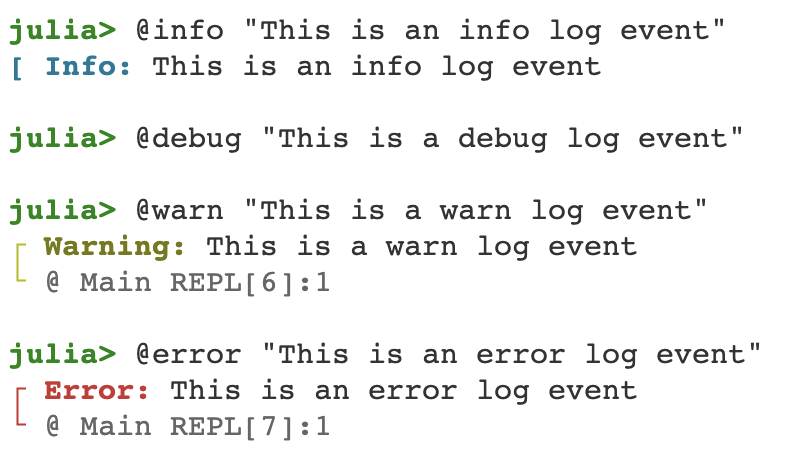
Note that when a logging macro is filtered out, it is not evaluated. This means that even if you include an expensive computation in the @debug macro, it won’t impact performance unless debug logging is enabled.
@time sum(rand(1_000_000));
@time sum(rand(10_000_000));
@time sum(rand(100_000_000));
@time @debug "$(sum(rand(1_000_000)))";
@time @debug "$(sum(rand(10_000_000)))";
@time @debug "$(sum(rand(100_000_000)))";
0.055473 seconds (2 allocations: 7.629 MiB, 96.55% gc time)
0.062360 seconds (2 allocations: 76.294 MiB, 69.84% gc time)
0.243096 seconds (2 allocations: 762.939 MiB, 1.24% gc time)
0.000003 seconds
0.000003 seconds
0.000002 secondsWith all logging macros, you can attach arbitrary data to any invocation. This can be useful for providing additional context when needed.
@info "Here's a Matrix " A = ones(3, 4)┌ Info: Here's a Matrix
│ A =
│ 3×4 Matrix{Float64}:
│ 1.0 1.0 1.0 1.0
│ 1.0 1.0 1.0 1.0
└ 1.0 1.0 1.0 1.0To enable debug logging quickly, you can set the JULIA_DEBUG environment variable to "all". If you’re only interested in debugging a specific module, you can set the variable to that module instead.
ENV["JULIA_DEBUG"] = Main # OR "all"
@debug "hi"
delete!(ENV, "JULIA_DEBUG");
┌ Debug: hi
└ @ Main In[9]:2Configuration
Julia provides a couple of different loggers to choose from out of the box. One such example is the SimpleLogger.
Using SimpleLogger
SimpleLogger is versatile as it accepts any stream as input, allowing you to easily create a file logger by opening a file and providing it with a file IOStream.
Here’s the documentation for SimpleLogger:
SimpleLogger([stream,] min_level=Info)Simplistic logger for logging all messages with level greater than or equal to min_level to stream. If stream is closed then messages with log level greater or equal to Warn will be logged to stderr and below to stdout.
And here’s an example of how to use it:
t = tempname()
io = open(t, "w+")
logger = SimpleLogger(io)
with_logger(logger) do
  @info("a context specific log message")
end
flush(io)
close(io)
The with_logger function enables you to create a local, context-specific logger for a particular section of your code. You can utilize this function to log messages within a specific context.
t = tempname()
io = open(t, "w+")
logger = SimpleLogger(io)
with_logger(logger) do
  @info("a context specific log message")
end
flush(io)
close(io)

println(read(t, String))
┌ Info: a context specific log message
└ @ Main In[12]:5
If you need to replace the global logger, you can use the global_logger function. This allows you to temporarily switch to a different logger for logging global messages before resetting it back to the default logger.
t = tempname()
io = open(t, "w+")
logger = SimpleLogger(io)

old_logger = global_logger(logger) # replace global logger

@info "a global log message"

global_logger(old_logger) # reset to default logger

flush(io)
close(io)

println(read(t, String))
┌ Info: a global log message
└ @ Main In[13]:7
When building a library, it’s generally recommended to use logging macros without configuring them, and leave the configuration up to the users of your package. If you’d like to, you can set up helper functions in your package to facilitate this process.
On the other hand, when building an application, you’ll typically want to set up logging in a specific way that aligns with your requirements and needs.
Making a Custom Logger
To create a custom logger, you’ll need to define a struct that is a subtype of AbstractLogger and implement the following interface functions:
handle_messageshouldlogmin_enabled_levelcatch_exceptions
For example, let’s create a logger that writes to a file and also prints to stdout.
Implementing a DualLogger
Let’s define a DualLogger struct that takes in two loggers: a file_logger and a console_logger. And let’s implement the required interface functions for this custom logger.
Base.@kwdef struct DualLogger <: AbstractLogger
  log_file::String
  file_logger = SimpleLogger(open(log_file, "w"))
  console_logger = SimpleLogger(stdout)
end
function Logging.handle_message(logger::DualLogger, level, message, _module, group, id, filepath, line; kwargs...)
  Logging.handle_message(logger.file_logger, level, message, _module, group, id, filepath, line; kwargs...)
  flush(logger.file_logger.stream)
  Logging.handle_message(logger.console_logger, level, message, _module, group, id, filepath, line; kwargs...)
  flush(logger.console_logger.stream)
end
Logging.shouldlog(logger::DualLogger, level, _module, group, id) = true
Logging.min_enabled_level(logger::DualLogger) = Logging.Info
Logging.catch_exceptions(logger::DualLogger) = true
When setting your custom logger as the global logger, you should be aware that users might have already customized the global logger before importing your package. To accommodate for this, it’s best practice to incorporate the current_logger into your logging setup.
Base.@kwdef struct DualLogger <: AbstractLogger
log_file::String
file_logger = SimpleLogger(open(log_file, "w"))
console_logger = SimpleLogger(stdout)
current_logger = current_logger()
end- 1
-
current_logger()returns the current global logger.
In this case, we’d have to update handle_message to include the current logger as well:
function Logging.handle_message(logger::DualLogger, args...; kwargs...)
  Logging.handle_message(logger.file_logger, args...; kwargs...)
  flush(logger.file_logger.stream)
  Logging.handle_message(logger.console_logger, args...; kwargs...)
  flush(logger.console_logger.stream)
  Logging.handle_message(logger.current_logger, args...; kwargs...)
end
Using DualLogger
Once you’ve defined your DualLogger, you can set it as the global logger.
original_logger = global_logger(DualLogger(; log_file = "./log/log.log"))ConsoleLogger(IJulia.IJuliaStdio{Base.PipeEndpoint}(IOContext(Base.PipeEndpoint(RawFD(43) open, 0 bytes waiting))), Info, Logging.default_metafmt, true, 0, Dict{Any, Int64}())And you can use the standard logging macros in your application as you normally would.
@info "info message"┌ Info: info message
└ @ Main In[16]:1To confirm that both the console and the log.log file contain the same output, you can read the content of the log file and print it.
println(read("./log/log.log", String))┌ Info: info message
└ @ Main In[16]:1
After you’re done using the custom logger, you can reset the global logger to its original state.
global_logger(original_logger)DualLogger("./log/log.log", Base.CoreLogging.SimpleLogger(IOStream(<file ./log/log.log>), Info, Dict{Any, Int64}()), Base.CoreLogging.SimpleLogger(IJulia.IJuliaStdio{Base.PipeEndpoint}(IOContext(Base.PipeEndpoint(RawFD(40) open, 0 bytes waiting))), Info, Dict{Any, Int64}()))Using LoggingExtras
In complex applications, it’s often necessary to have finer control over your logging requirements. There are a number of different packages available in the Julia ecosystem that make logging more powerful and easier to use.
In this tutorial, let’s explore LoggingExtras.jl. The LoggingExtras.jl package provides the functionality needed to seamlessly integrate custom features into your application.
LoggingExtras.jl implements a composable logging system with four kinds of loggers:
- Sinks
- Filters
- Transformers
- Demux
You can think of these loggers as building blocks to create the logging system you desire.
Here’s the example of the DualLogger from earlier implemented using LoggingExtras.jl:
function DualLogger(; log_file = "log/log.log")
  TeeLogger(
    FileLogger(log_file),
    SimpleLogger(stdout), # OR ConsoleLogger(),
    current_logger(),
  )
end
From the LoggingExtras.jl’s documentation, here’s what an implementation of the built-in ConsoleLogger would look like:
ConsoleLogger(stream, min_level) =
  MinLevelLogger(ActiveFilteredLogger(max_log_filter, PureSinkConsoleLogger(stream)), min_level)
For example, let’s say you want your application’s log messages to include the current timestamp, filename, and line number where the log event occurred. Additionally, you may prefer separate log files for different purposes, such as having all debug events and exceptions in a debug.log file while keeping only info events in the info.log file. You might also want the console log format to differ from that in the log files.
You can do all of that and more quite easily with LoggingExtras.jl. Let’s take a look at how you might implement this example.
Setting Up LoggingExtras
First, you want to import required the packages:
using Logging
using LoggingExtras
using LoggingFormats
using Dates
You can define some constants as global variables:
const DEFAULT_LOGGER = current_logger() # Refers to the current logger
const DATE_FORMAT = dateformat"yyyy-mm-ddTHH:MM:SS" # Specifies the format to use for dates in log messages
const PARENT_MODULE = parentmodule(@__MODULE__) # Refers to the parent module of the current module
const LOG_FOLDER =
  isnothing(pkgdir(PARENT_MODULE)) ? joinpath(@__DIR__, "log") : joinpath(dirname(pkgdir(PARENT_MODULE)), "../log/") # Specifies the folder where log files will be saved
When using LoggingExtras, you’ll first want to determine which loggers to compose with each other. For our example, we’ll start with a TeeLogger to send logs to multiple different loggers.
  global_logger(
    TeeLogger(
      logger1,
      logger2,
      logger3,
      ...
    ),
  )
To include the filename in the formatted log event, you can create a function that filters out log messages where the module isn’t what we are interested in, and another function that uses the TransformerLogger to transform the log message format to include the filename.
function module_message_filter(log)
log._module !== nothing && (
log._module === PARENT_MODULE ||
parentmodule(log._module) === PARENT_MODULE
)
end
function filename_logger(logger)
TransformerLogger(logger) do log
merge(log, (;
message = "$(basename(log.file)) - $(log.message)")
)
end
end
logger1 = EarlyFilteredLogger(
module_message_filter, filename_logger(DEFAULT_LOGGER)
)
logger2 = EarlyFilteredLogger(
!module_message_filter,
DEFAULT_LOGGER
)- 1
- This function filters out log messages where the parent module isn’t what we are interested in.
- 2
-
This function uses the
TransformerLoggerto transform the log message format to include the filename. - 3
-
In Julia
!freturns the composition function(!) ∘ f.
Lastly, to store all logs in specific files in a specific format, you can use the FormatLogger.
function file_logger(; name = "info")
  # The FormatLogger constructor takes a file path and a function that formats log messages
  FormatLogger(joinpath(LOG_FOLDER, "$name.log"); append = false) do io, args
    # Use datetime in log messages in files
    date = Dates.format(now(), DATE_FORMAT)
    # pad level, filename and lineno so things look nice
    level = rpad(args.level, 5, " ")
    filename = lpad(basename(args.file), 10, " ")
    lineno = rpad(args.line, 5, " ")
    message = args.message
    # Write the formatted log message to the file
    println(io, "$date | $level | $filename:$lineno - $message")
    # If the log message includes an exception, print it explicitly
    if :exception ∈ keys(args.kwargs)
      e, stacktrace = args.kwargs[:exception]
      println(io, "exception = ")
      showerror(io, e, stacktrace)
      println(io)
    end
  end
end

logger3 = EarlyFilteredLogger(
  module_message_filter, MinLevelLogger(file_logger(; name = "debug"), Logging.Debug)
)
Creating a Logger Module
Let’s define a Logger module that offers the logging functionalities described above for your program.
You can create a file named src/logger.jl in your package with the code. For convenience, I’ve put it all together in one place so you can open the fold open the code below to copy and paste into your application.
Code
module Logger
"""
A module for initializing a logging system.

This module creates multiple loggers that write to different files and formats the log messages in a specific way.
The log files are saved in a folder specified by the constant `LOG_FOLDER`.

Reference: https://juliacheat.codes/tutorials/getting-started-logging-julia/
"""

# Import required packages
using Logging
using LoggingExtras
using LoggingFormats
using Dates

# Define constants
const DEFAULT_LOGGER = current_logger() # Refers to the current logger
const DATE_FORMAT = dateformat"yyyy-mm-ddTHH:MM:SS" # Specifies the format to use for dates in log messages
const PARENT_MODULE = parentmodule(@__MODULE__) # Refers to the parent module of the current module
const LOG_FOLDER =
  isnothing(pkgdir(PARENT_MODULE)) ? joinpath(@__DIR__, "log") : joinpath(dirname(pkgdir(PARENT_MODULE)), "../log/") # Specifies the folder where log files will be saved

"""
A function to filter log messages by module.

This function takes a log object and returns `true` if the module of the log is equal to the parent module of the current module.

Args:

  - log (LogRecord): The log message to be filtered.

Returns:

  - bool: `true` if the module of the log is equal to the current module or parent module of the current module, `false` otherwise.
"""
function module_message_filter(log)
  log._module !== nothing && (log._module === PARENT_MODULE || parentmodule(log._module) === PARENT_MODULE)
end

"""
A function to create a file logger.

This function creates a logger that logs messages to a file with the specified name in the `LOG_FOLDER` directory.
The logger formats the log messages in a specific way and includes the current date, log level, filename, line number, and message.

Kwargs:

  - name (str): The name of the log file. Defaults to "info".
  - exceptions (bool): Whether or not to print the exception in the log message. Defaults to `true`.

Returns:

  - FormatLogger: A logger that logs messages to a file with the specified name in the `LOG_FOLDER` directory.
"""
function file_logger(; name = "info", exceptions = true)
  # The FormatLogger constructor takes a file path and a function that formats log messages
  FormatLogger(joinpath(LOG_FOLDER, "$name.log"); append = false) do io, args
    # Use datetime in log messages in files
    date = Dates.format(now(), DATE_FORMAT)
    # pad level, filename and lineno so things look nice
    level = rpad(args.level, 5, " ")
    filename = lpad(basename(args.file), 10, " ")
    lineno = rpad(args.line, 5, " ")
    message = args.message
    # Write the formatted log message to the file
    println(io, "$date | $level | $filename:$lineno - $message")
    # If the log message includes an exception, print it explicitly
    if exceptions && :exception ∈ keys(args.kwargs)
      e, stacktrace = args.kwargs[:exception]
      println(io, "exception = ")
      showerror(io, e, stacktrace)
      println(io)
    end
  end
end

"""
A function to add the filename to log messages.

This function takes a logger and returns a new logger that includes the filename of the log message in the log message.

Args:

  - logger (AbstractLogger): The logger to transform.

Returns:

  - TransformerLogger: A new logger that includes the filename of the log message in the log message.
"""
function filename_logger(logger)
  TransformerLogger(logger) do log
    merge(log, (; message = "$(basename(log.file)) - $(log.message)"))
  end
end

"""
A function to initialize the logger.

This function initializes the logging system by creating the log folder if it doesn't already exist and setting up multiple loggers that log messages with different levels to different log files.
It also logs a message to indicate that the logger has been initialized.
"""
function initialize()
  # Create the log folder if it doesn't already exist
  isdir(LOG_FOLDER) || mkpath(LOG_FOLDER)
  # Initialize the global logger with several loggers:
  global_logger(
    # A logger that logs messages from the current module with a minimum level of Info to a file called "info.log" in the LOG_FOLDER directory
    TeeLogger(
      EarlyFilteredLogger(
        module_message_filter,
        MinLevelLogger(file_logger(; name = "info", exceptions = false), Logging.Info),
      ),
      # A logger that logs messages with a minimum level of Debug to a file called "debug.log" in the LOG_FOLDER directory
      EarlyFilteredLogger(module_message_filter, MinLevelLogger(file_logger(; name = "debug"), Logging.Debug)),
      # A logger that logs messages from the current module with the filename appended to the message to the current logger
      EarlyFilteredLogger(module_message_filter, filename_logger(DEFAULT_LOGGER)),
      # A logger that logs messages from other modules to the current logger
      EarlyFilteredLogger(!module_message_filter, DEFAULT_LOGGER),
    ),
  )
  # Log a message to indicate that the logger has been initialized
  @debug "Initialized logger"
  nothing
end

"""
A function to reset the logger.

This function resets the global logger to the original logger.
"""
function reset()
  # Reset the global logger to the original logger
  global_logger(DEFAULT_LOGGER)
  nothing
end

end # module Logger
Once you have set up this module, you can easily log messages from your Julia program by importing the module and utilizing the logging macros (e.g., @info, @debug, @warn, etc.) provided by the built-in Logging package. Log messages will be saved in the LOG_FOLDER directory and displayed on the console.
To initialize the logger, simply add Logger.initialize() in your package’s __init__ function, as shown in the following example:
module Foo

include("logger.jl")

function __init__()
  Logger.initialize()
end

function foo()
  @info "hello world"
end

end;
After implementing this logging functionality, you can expect output similar to the following example:
@info "hello world"

try
  1 + "1"
catch err
  @error "Something went wrong: $err" exception = (err, catch_backtrace())
end
[ Info: In[20] - hello world
┌ Error: In[20] - Something went wrong: MethodError(+, (1, "1"), 0x0000000000007eeb)
│ exception =
│ MethodError: no method matching +(::Int64, ::String)
│ Closest candidates are:
│ +(::Any, ::Any, ::Any, ::Any...) at operators.jl:591
│ +(::T, ::T) where T<:Union{Int128, Int16, Int32, Int64, Int8, UInt128, UInt16, UInt32, UInt64, UInt8} at int.jl:87
│ +(::Union{Int16, Int32, Int64, Int8}, ::BigInt) at gmp.jl:537
│ ...
│ Stacktrace:
│ [1] top-level scope
│ @ In[20]:5
│ [2] eval
│ @ ./boot.jl:368 [inlined]
│ [3] include_string(mapexpr::typeof(REPL.softscope), mod::Module, code::String, filename::String)
│ @ Base ./loading.jl:1428
└ @ Main In[20]:7Here’s the content of the log files when I executed the code above:
info.log:
2023-04-09T12:25:40 | Info  |     In[20]:2     - hello world
2023-04-09T12:25:41 | Error |     In[20]:7     - Something went wrong: MethodError(+, (1, "1"), 0x0000000000007eeb)
debug.log:
2023-04-09T12:25:40 | Debug |     In[19]:123   - Initialized logger
2023-04-09T12:25:40 | Info  |     In[20]:2     - hello world
2023-04-09T12:25:41 | Error |     In[20]:7     - Something went wrong: MethodError(+, (1, "1"), 0x0000000000007eeb)
exception =
MethodError: no method matching +(::Int64, ::String)
Closest candidates are:
  +(::Any, ::Any, !Matched::Any, !Matched::Any...) at operators.jl:591
  +(::T, !Matched::T) where T<:Union{Int128, Int16, Int32, Int64, Int8, UInt128, UInt16, UInt32, UInt64, UInt8} at int.jl:87
  +(::Union{Int16, Int32, Int64, Int8}, !Matched::BigInt) at gmp.jl:537
  ...
Stacktrace:
 [1] top-level scope
   @ In[20]:5
 [2] eval
   @ ./boot.jl:368 [inlined]
 [3] include_string(mapexpr::typeof(REPL.softscope), mod::Module, code::String, filename::String)
   @ Base ./loading.jl:1428
Conclusion
By leveraging the LoggingExtras package, the built-in Logging module, and a Logger module like the one shown above, you can effectively manage and customize your logging needs, ensuring that your application runs smoothly and efficiently.
Reuse
Citation
For attribution, please cite this work as:
“Get Started with Logging in
Julia,” Apr. 02, 2023. https://juliacheat.codes/how-to/get-started-with-logging.